
Where to Place QR Code Menus: 15 Effective Locations
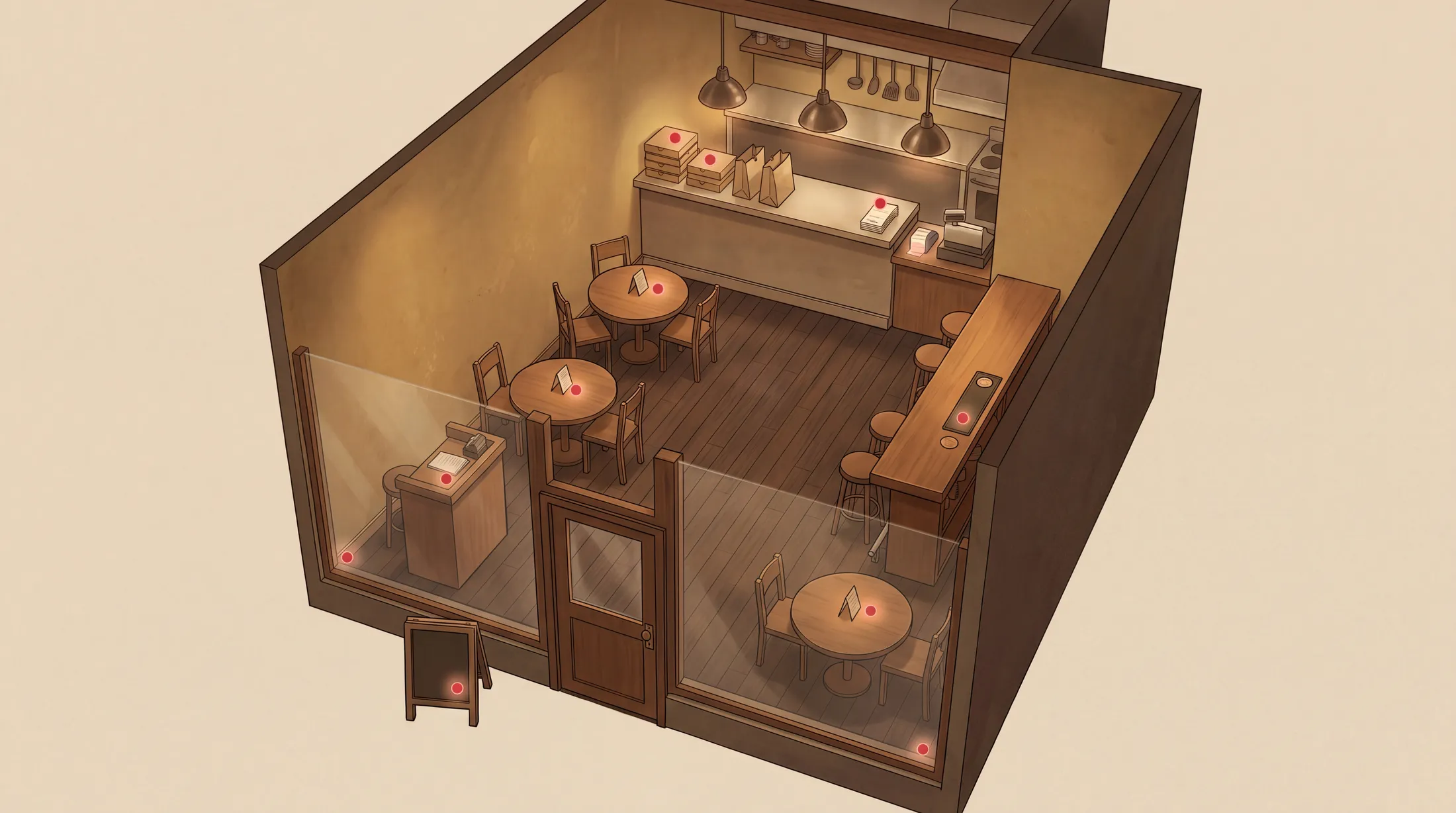
Most restaurants print one QR code on a table tent and consider the placement decision finished. This captures the seated guest who is about to order, which is valuable, but it ignores at least four other moments where a QR scan would matter:
TL;DR — Key Takeaways
The default placement (one QR on a table tent) captures only a fraction of possible scans. Restaurants that place QR codes in 5+ locations see 2–3x the engagement.
The five highest-impact placements outside the table are: front window, menu corner, receipt, takeaway packaging, and the chef's pass-through — each of which catches a different moment in the guest journey.
QR codes printed below 3cm × 3cm fail on older phone cameras. Aim for 4cm minimum on table-level signage and 10cm+ on window decals.
Every printed touchpoint that gets attention from the guest is a candidate placement: business cards, takeaway boxes, social media bios, voucher inserts, parking-meter receipts, festival booth signage.
High-conversion placements share three traits: visible at a moment of interest, easy to scan from a comfortable phone-holding posture, and printed at a size that older phones can read.
Why "just put it on the table" misses most of the value
Most restaurants print one QR code on a table tent and consider the placement decision finished. This captures the seated guest who is about to order, which is valuable, but it ignores at least four other moments where a QR scan would matter:
The passerby glancing at the front window deciding whether to come in.
The takeaway customer at the counter or curbside who never sees the table.
The after-meal guest holding their receipt, considering a return visit or a tip-amount question.
The off-premise guest who saw your business card or social media post and wants to view the menu before booking.
Each of these moments has its own optimal QR placement. A restaurant running QR codes in 5+ locations doesn't just multiply scans — it captures different kinds of guests. The 15 placements below are organized by the moment in the guest journey they serve.
Pre-arrival placements (capturing intent before the guest sits down)
1. Front-window decal
The single highest-leverage QR placement for any restaurant in a tourist-foot-traffic area. A clear QR code, 10cm+, applied to the inside of the front window at eye height. Tourists routinely scan window QRs to preview the menu before deciding whether to enter. A multilingual menu behind the QR is what closes the decision.
Pro tip: add a small tagline above the QR in the local language: "Menu in your language — scan to view."
2. Sandwich-board sidewalk sign
For restaurants with a sidewalk presence, the sandwich-board QR doubles the conversion of the board itself. A restaurant with "Today's Special: Branzino al Sale €24" handwritten on the board and a QR below the line gets 3x the curious scanners.
3. Hotel concierge cards
For restaurants in tourist districts, partner with nearby hotels to place a small card at the concierge desk with a QR linking to your menu. Cost: $0 to print, $0 to deliver, asymmetric upside.
4. Tourist information centre brochures
Some cities allow restaurants to place small flyers in tourist info centres. A 5cm QR on the flyer, with no fluff, drives genuine interest.
5. Public transit / taxi seat-back ads
Major cities have restaurant-ad slots in taxis and rideshares. A QR menu link converts vastly better than a website URL, because guests can scan from a moving vehicle without typing.
At-table placements (capturing the seated guest)
6. Standard table tent — front and back
The default, but execute it properly. A double-sided table tent with the QR code prominent on both sides, plus a brief "Menu in your language, allergen filter, calorie info" line, captures every guest at the table without forcing them to flip the tent.
7. Menu corner (if you keep paper menus)
A small QR in the bottom-right corner of any printed menu invites guests to switch to the digital version for translation, allergen filter, or photo previews. A surprising number of guests scan this even when paper is in their hands — they want photos.
8. Coaster
A QR on the underside of the coaster, with a "Drinks menu" label, captures bar-only guests who skip the food menu. Especially powerful for cocktail bars and wine bars.
9. Wall-mounted plaque
A larger QR on the wall near the door or above the bar serves guests at counter-height seating, takeaway customers, and waiting parties. Frame it elegantly and it becomes part of the décor rather than an eyesore.
10. Chef's pass-through window
Counter-intuitively, placing a QR at the chef's pass-through (where dishes leave the kitchen for the dining room) catches off-duty staff and visiting industry guests who want to see the structured menu. Low volume but high-quality scans.
Post-meal placements (capturing intent after the guest has eaten)
11. Receipt / bill folder
Print the QR on the receipt or inside the bill folder. The guest is already holding it and reading it. A small QR with "View tonight's menu / leave us a review" captures repeat-visit intent and review traffic at the same time.
12. Takeaway packaging
For restaurants with takeaway business, every box, bag and napkin sleeve is a scan opportunity. A QR labeled "Reorder online / view full menu" on the side of a takeaway box converts at higher rates than any pre-printed menu insert.
13. Loyalty / punch card
Hand the guest a small loyalty card with a QR that lets them register the visit digitally. Modern QR menus can integrate with loyalty programs, replacing punch cards entirely.
14. Business card
Every business card the owner hands out should include a QR linking to the menu. This is the single most-overlooked QR placement and the cheapest to add.
15. Social media bio link
Strictly speaking not a "QR placement," but the same logic applies — Instagram, TikTok and Facebook bios should link to the menu, not the website homepage. The QR menu link is the highest-converting bio link a restaurant can use.
How big should a QR code be?
Size by placement:
Table tents and menu corners:4cm × 4cm minimum. Anything smaller forces older phone cameras to angle awkwardly.
Window decals:10cm × 10cm minimum, ideally 15cm. Has to be visible from a 2-meter distance for passersby.
Sandwich boards:8cm × 8cm minimum. Mid-distance read.
Coasters and small print:3cm × 3cm absolute minimum, with the caveat that older phones may struggle.
Receipts:2.5cm × 2.5cm is usually the practical minimum, but check that your receipt printer's resolution can render the code without blurring.
Wall plaques: scale to viewing distance — a 1-meter viewing distance needs at least 6cm × 6cm.
Always test the code with three phones (iPhone, Android, an older device 4+ years old) before committing to a print run.
Printable QR code design rules
Six rules that prevent the most common QR-printing failures:
1. High contrast. Black on white is the gold standard. Colored QRs work, but only with strong contrast. Pastels and gradients fail on older cameras.
2. White margin. QR codes need a "quiet zone" — a white border at least 4 modules wide around the pattern. Cropping into this margin breaks scanning.
3. Solid background. Don't print QRs over photographs or busy backgrounds. The pattern needs visual separation from anything behind it.
4. Flat surface. QR codes on curved surfaces (water bottles, wine bottles, mugs) require precise scanning angles. Use them sparingly and test thoroughly.
5. No reflective surfaces. Glossy laminates that reflect overhead lights make QR codes unreadable in many lighting conditions. Matte finishes scan reliably.
6. Logo in the centre is fine. Modern QR codes can have a logo in the centre without breaking, thanks to error-correction encoding. But keep the logo to less than 25% of the QR area.
What about creative or custom QR designs?
Branded QR codes (with restaurant colors or stylized patterns) are increasingly common and most modern hospitality platforms support them. The trade-off:
Pros: brand consistency, "this is our QR" recognition, premium feel.
Cons: slightly higher scan failure rate on older phones, slightly slower scan times, marginally less reliable in dim lighting.
For most restaurants, a black-on-white QR with the restaurant's logo in the centre is the right balance. The full-custom branded QR (where the entire pattern is restyled) looks great in marketing photos but loses you 2–5% of scans in actual use.
How to track which placement is performing
Your menu can tell you which channel a guest came from. Intermenu's menu insights sort visits into QR scans, direct links, other websites and tagged campaign links, so you can see how much of your traffic comes from printed codes and how much from everything else.
Set this up at launch:
Put the QR code (it points at your live menu) on every printed surface.
For placements that aren't printed codes (your Instagram bio, a newsletter, a partner's website), use a tagged campaign link, so those visits show up as their own source.
The menu views screen then shows where guests came from over 7, 30 or 90 days.
After 30 days, you'll know how much of your menu traffic comes from printed QR codes and how much from links, and whether moving or adding a code changes the count. Some results will surprise you.
Intermenu records QR scans as their own source by default, and every printed code points at the same live menu, so a code never needs replacing when the menu changes.
Placement mistakes that kill scan rates
Five common placement mistakes seen in field audits:
1. QR codes hidden behind objects. Salt and pepper shakers, candles, flower vases — all of these end up covering the table-tent QR within 10 minutes of opening. Place QR codes where they remain visible after the table is fully set.
2. QR codes facing the wrong direction. A table-tent QR that faces the chair rather than the seated guest forces the guest to pick up the tent. Most won't.
3. QR codes printed on dark surfaces. A black QR on a dark wood table corner, even at high contrast, is hard for older cameras. Use a printed sticker on a light background, or a tent stand.
4. QR codes in the kitchen, not the dining room. Some operators put the menu QR on the kitchen door for staff reference and forget to put it where guests can see it. This is funny and not uncommon.
5. QR codes pointing at outdated menus. The tent says "Scan for menu," the QR works, the menu loads — but it's last season's menu. Make sure your QR points at your live menu, not at a file (so it always shows the current menu), and verify monthly.
Frequently Asked Questions
Where do customers actually look for QR menus? The center of the table first, then the corner of the printed menu, then the wall near the door. The front window is checked before sitting down. The receipt is checked after.
Should I put a QR code on my window for passersby? Yes — this is one of the highest-leverage placements for tourist-area restaurants. A clear 10cm+ QR with a multilingual-menu tagline drives genuine pre-arrival interest.
How big should a QR code be on a menu?3cm × 3cm minimum on a printed menu corner. 4cm × 4cm on a table tent. 10cm+ on a window decal.
Can I print QR codes on receipts and napkins? Yes for receipts (2.5cm minimum, verify printer resolution). Napkins are tricky because the porous surface causes ink spread and scanning fails — test before scaling.
What's the best QR code placement for outdoor seating? A weather-protected sandwich board with the QR + today's special, plus a laminated table tent at each outdoor table (sealed against rain).
Get a Print-Ready QR Code
Most restaurants under-place their QR codes by 60–70%. The fix isn't more printing budget — it's smarter placement at the moments where guests are actually deciding.
Intermenu gives you the QR code on its "My QR & live menu" page as a sharp vector file that scales to any size, plus a print-ready sheet and print guidance, including printing it at least 3 cm wide and keeping the pale border.
Download your QR code and place it where guests actually decide →